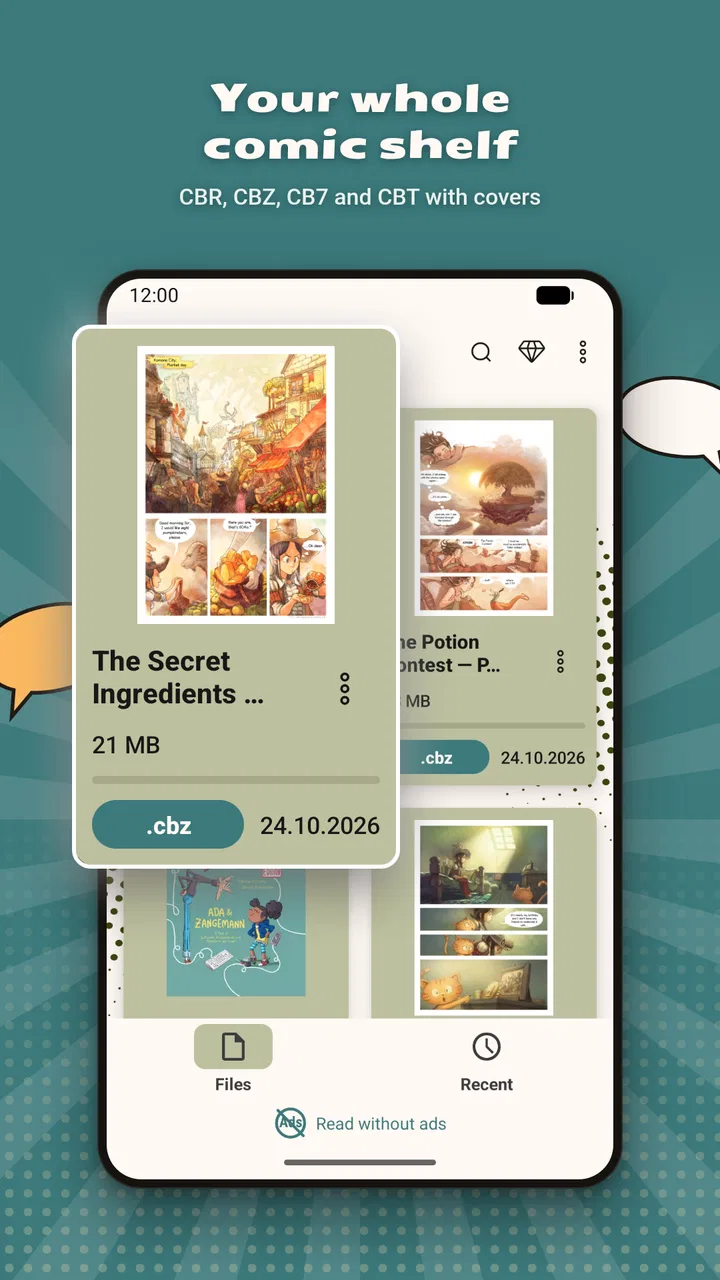
Comic Book Reader (cbz/cbr)
- 4.4
- Rating
- 500.00K
- Installs
- Free
- Price

 Analysis by App-foxy
I spent time using Comic Book Reader (cbz/cbr) as a straightforward way to open and read digital comics, and my overall impression is that it is aimed at readers who want less fuss between choosing a file and reaching the first page. It belongs to the Comics category, comes from Android Tools (ru), and is free to install, although purchases inside the app range from $0.99 to $99.99 per item. The app is suitable for Everyone, which makes its basic audience broad, but its real appeal is more specific: people who already keep comics in different file formats and want one reader instead of several separate tools.
The app has reached over 500 thousand installs and holds a 4.4 average from around 7.9 thousand ratings. Those figures suggest that it has found a practical audience rather than being an obscure experiment. I would not treat popularity alone as proof that every reader will enjoy it, though. A comic reader succeeds or fails on small daily details: how quickly a book opens, whether pages remain comfortable to view, how it behaves with large collections, and how easily I can recover when a file or device causes trouble.
How Comic Book Reader feels in everyday reading
The first thing I noticed is that this is a utility rather than a social comics platform. I would choose it when I have my own CBZ or CBR files and want to read them locally, not when I am looking for a built-in catalog, recommendations, or a subscription library. That distinction matters because many modern comic services are designed around discovering and streaming licensed content. This app is more direct: the files are the center of the experience.
You May Also Like

 Pandora - Music & Podcasts
Pandora’s Music Is Easy to Start, but Harder to Recover
Pandora’s strength is its low-effort path from a seed to a station. Its weak spot is how much confidence it asks you to place in connection, setup, and quiet recovery.

 8 Ball Pool
 Is Built on Rivalries, Rematches, and Routine
A close look at the rivalries, rematches, shared routines, and unanswered safety questions that turn a quick pool match into a persistent mobile community.

 Samsung Music
’s Quiet Strength Is Playing What You Already Own
Its reach comes less from spectacle than from dependable access to a personal library. That simplicity is both the app’s strongest retention engine and its ceiling.

 AccuWeather: Weather Radar
AccuWeather Review: A Quick, Clear Forecast for Everyday Decisions
For everyday plans, the best forecast is the one you can understand quickly. AccuWeather makes rain timing, radar, and local conditions easy to act on, with a few trade-offs.

 Hill Climb Racing
Why Hill Climb Racing Still Turns Crashes Into One More Run
A tiny car, a bumpy hill and one more upgrade: Hill Climb Racing keeps resurfacing because its simple chaos makes every near-miss feel personal.

 AliExpress - Shopping App
AliExpress Makes Global Shopping Feel Personal, but Shoppers Bear the Risk
AliExpress turns a global marketplace into a pocket-sized discovery engine. Its reach is useful, its shopping loop compelling, and its trade-offs easy to miss.
More From Our News Desk
View All News


That direct approach is useful for a familiar situation. Imagine downloading several issues before a train journey, saving them on an Android phone, and wanting to read without searching through a general file manager each time. A dedicated reader can make that routine feel more natural than opening archives manually. I can keep the reading task separate from documents, photographs, and downloads, which is a small improvement but one I appreciate when I am carrying a larger collection.
The store describes it as a reader for comics in all formats, while its short description identifies it simply as a Comic Book Reader. In practice, the important point for me is support for the formats named in the app title: CBZ and CBR. These are common comic-book archive containers, but they are still archives rather than ordinary image files. A reader that understands them saves the extra step of unpacking pages before reading.
The strongest reason to try it is convenience for an existing personal collection, not content discovery. If your comics are already organized as files, the app fits that workflow. If you expect a store, cloud library, or a large set of editorial recommendations, you may find the experience too narrow.
Speed expectations before opening a large collection
I judge a comic reader’s speed less by a single dramatic launch and more by the repeated transitions that happen during a reading session. Opening a book, moving between pages, returning to a collection, and resuming a partially read issue all shape whether the app feels pleasant. Comic Book Reader is built around that simple loop, so it makes sense for readers who value a quick path from file selection to page viewing.
There is an important limit to any claim about speed here: the result depends heavily on the device, the archive, and the images inside it. A short comic made from modest page images should be easier to handle than a long archive filled with large scans. I would therefore avoid assuming that every file will open equally quickly. The app’s version 1.0.98 indicates that it has been maintained beyond its original release, but a version number by itself cannot guarantee identical performance on every Android phone.
My practical advice is to test one representative file before moving an entire library into the app. Choose a normal issue and one of your heaviest scans. If both behave comfortably, you have a better indication of whether the reader matches your collection than any general speed promise. This is also a sensible way to avoid filling a phone with files before discovering that a particular archive is inconvenient to use.
For page-by-page reading, the most useful performance quality is consistency. A reader does not need to feel spectacular; it needs to avoid making me wait or lose my place every few pages. Comic Book Reader’s focused purpose gives it a reasonable starting point, but I would still keep expectations realistic with oversized scans and older hardware.
What happens during heavy-use moments
The demanding moments are not limited to opening the app. They include loading a large archive, jumping repeatedly through pages, rotating the device, and switching away from the reader before returning later. These actions can expose differences between a lightweight comic and a high-resolution collection. For that reason, I would not judge the app solely on a quick test with one small file.
A useful workflow is to divide a long reading session into manageable groups. Instead of keeping every issue ever downloaded in one crowded folder, I would separate current reading, completed books, and archived material. This is not a feature claim; it is a way to reduce the amount of searching and make the reader easier to use. It also helps identify whether a problem belongs to the app or to one damaged, unusually large, or oddly packaged archive.
Another practical tip is to keep a backup of important comics outside the reading device. A reader is a viewing tool, not a replacement for an organized library. If I rely on a phone as the only copy of a collection, any storage problem, accidental deletion, or device change becomes more serious. Keeping the original files elsewhere makes experimentation safer and makes recovery less stressful.
For long sessions, screen comfort may matter more than raw loading speed. I would use the app for focused reading, then close it when I am finished rather than leaving several demanding books open in the background. That habit is especially sensible on a phone with limited storage or memory. It keeps the reading routine simple and avoids confusing a performance issue with a problem in the comic archive itself.
Stability, interruptions, and getting back to a book
Reliability in this kind of app means more than avoiding a crash. I also want predictable file handling, a clear route back to my collection, and a reasonable chance of continuing after an interruption. A phone call, a low-battery warning, or a quick switch to another app is enough to test whether a reader feels dependable in ordinary life.
I would be most cautious with files obtained from different sources. CBZ and CBR archives can vary in how their pages are arranged and packaged, so one troublesome file should not automatically be treated as evidence that every book will behave the same way. When something goes wrong, I would first try another archive, check whether the file opens elsewhere, and keep the original untouched. That simple recovery sequence can save time and helps separate a bad file from an app issue.
The app’s free entry point also makes this testing easy. I can install it, try the files I actually read, and decide whether its workflow suits me before spending anything. The presence of in-app purchases means I would pay attention to what is included in the free experience and what requires a purchase, especially if I am choosing it for a large personal library. The price range is wide enough that I would not assume every reader has the same purchase needs.
One limitation is that a focused local reader may not solve every continuity problem. If I regularly move between multiple devices, I would prefer a service or setup designed around synchronized libraries and reading progress. Comic Book Reader makes more sense when my collection is stored on the Android device I am using. That is a genuine trade-off: local files can be direct and private, but they may require more personal organization.
Device constraints and choosing the right setup
The minimum operating-system requirement is Android 6.0, so the app is not restricted to only the newest phones. That broad compatibility is helpful for readers using an older device as a dedicated comic reader. At the same time, compatibility does not mean every device will offer the same comfort. Screen size, storage space, available memory, and display quality all influence the experience.
A phone is convenient for short reading sessions and travel, but a larger screen is usually better for detailed artwork and full-page layouts. If I am reading on a small display, I expect to zoom or adjust my position more often, which can make dense pages tiring. The app can still be useful there, but I would choose it for portability rather than the best presentation of intricate artwork.
Storage deserves special attention. Comic archives can become substantial when a collection includes many issues or high-quality scans. Before importing everything, I would check available space and keep only the books I plan to read soon on the device. This “active shelf” approach is more practical than treating a phone as an unlimited archive, and it makes browsing less cluttered.
Older hardware may also be a better match for a smaller active library than for a huge one. If a device is already close to its storage limit or struggles with other demanding apps, a comic reader cannot remove those underlying constraints. I would use a modest test collection first, especially before a trip when reliable offline access matters.
The Everyone content rating is reassuring for households that want a general-purpose reading tool, but it should not be confused with a guarantee about every comic file opened through it. The app is a reader; the material comes from the user’s collection. Parents should still consider the content of the files being added, even though the application itself carries an Everyone rating.
Where it beats usual alternatives
Compared with opening CBZ or CBR files through a general archive utility, this app is the more natural choice for repeated reading. A file manager can help locate a download, but it is not designed around the rhythm of turning comic pages. A dedicated reader reduces the number of unrelated steps between the archive and the artwork.
Compared with a subscription comics service, the advantage is control over personal files. I am not tied to a catalog or dependent on a particular online library for the books I already own. That is valuable for independent releases, personal scans, backups, and collections gathered from different places. The disadvantage is that I must manage the files myself and should not expect the discovery features or synchronized ecosystem of a subscription platform.
Compared with a full desktop comics library, the Android app is more convenient for carrying a collection but less suited to elaborate catalog management. A computer may be better when I want to rename hundreds of files, maintain detailed metadata, or organize a large archive carefully. Comic Book Reader is the reading end of that process, not necessarily the complete solution for collection administration.
There is also a difference between reading and editing. If I need to repair page order, remove unwanted pages, convert archives, or clean up filenames, I would use a separate tool before opening the result here. Trying to make a reader perform library-maintenance work is usually less efficient than preparing the files once and keeping the reading app focused.
Who should use it, and who should skip it
I would recommend Comic Book Reader to someone with a personal set of CBZ or CBR comics who wants a free starting point on Android. It is especially suitable for travel, short evening reading, and keeping a small rotation of issues available on a phone or older tablet. The broad operating-system support and Everyone rating make it approachable, while the established install base and 4.4 average provide some reassurance that the basic concept works for many readers.
I would also consider it for a family device where the goal is simply to open appropriate comic files without introducing a complicated media platform. The key is to organize the files beforehand and keep the active selection small. That makes the app easier to hand to another reader and reduces the chance of searching through a chaotic download folder.
I would skip it if my main requirement is buying comics inside the app, discovering new series through recommendations, or automatically keeping reading progress synchronized across several devices. I would also look elsewhere if I need advanced collection management, detailed metadata editing, or a highly specialized reading environment for unusual archive workflows. In those cases, a desktop library manager, a cloud-based service, or a more feature-heavy reader may be a better fit.
People who dislike managing files should think carefully before installing it. The app can make reading archives easier, but it cannot organize a messy collection by itself in the way a dedicated catalog system might. The smoother experience comes when I already know where my comics are stored and have a simple naming or folder plan.
My performance verdict after weighing the trade-offs
Comic Book Reader (cbz/cbr) is a sensible, focused app for Android readers who want to open personal comic archives without turning the task into a technical project. Its free price makes it easy to test, its current version is 1.0.98, and its long availability since Jan 1, 2020 gives it more history than a brand-new reader. I see it as a practical tool rather than an all-in-one comics ecosystem.
My recommendation comes with a clear condition: use it with a realistic collection and test your largest typical file before committing to a full library. Keep backups, maintain an active shelf on the device, and choose a larger screen when artwork detail matters. Those habits address the main constraints that affect speed, storage, and recovery, regardless of which reader is installed.
In the end, I would choose it for direct local reading and skip it for catalog discovery or multi-device synchronization. It earns a place on my Android shortlist because it concentrates on the basic job and is easy to try without an upfront charge. If your comics already live in CBZ or CBR files, this is the kind of uncomplicated reader I would test first.
FAQs for Comic Book Reader (cbz/cbr)
01What file formats does the Comic Book Reader support?
The Comic Book Reader app supports a variety of popular comic book formats, including CBZ and CBR. These formats are widely used for digital comic books, ensuring you can access a broad range of comics. Additionally, the app may support other formats like PDF or EPUB, depending on updates and user needs.
02Is the Comic Book Reader available for both Android and iOS?
Yes, the Comic Book Reader is available for download on both Android and iOS platforms. This cross-platform availability allows users to access their comic collections on a variety of devices, whether they prefer smartphones or tablets, ensuring a seamless reading experience across devices.
03Does the Comic Book Reader offer cloud synchronization?
The Comic Book Reader app typically offers cloud synchronization, allowing you to sync your reading progress and comic library across multiple devices. This feature is essential for users who switch between devices frequently, ensuring that your place in a comic is never lost and your library is always up to date.
04Can I customize the reading experience in the Comic Book Reader?
Yes, the Comic Book Reader app usually provides various customization options to enhance your reading experience. You can adjust settings such as page layout, zoom levels, and background colors. Additionally, features like night mode and brightness adjustment help reduce eye strain during prolonged reading sessions.
05Is there a cost associated with downloading or using the Comic Book Reader?
The Comic Book Reader app may be available as a free download, but some features might be locked behind a premium version or in-app purchases. Users should check the app's store page for specifics on pricing, which can include one-time purchases, subscriptions, or ad-supported models. Always review payment details before downloading.
Pros
- Supports multiple file formats (CBR
- CBZ).
- Smooth and intuitive page navigation.
- Customizable reading settings.
- Offline reading capability.
- Bookmarks for easy access.
Cons
- Limited cloud storage integration.
- Occasional crashes on older devices.
- Ads can be intrusive.
- No annotation features available.
- Limited library organization tools.

Comic Book Reader (cbz/cbr)
Gallery